Get quotes as notifications
Moneyfesting can send you quotes and affirmations through the day, from the categories you like. You choose the days, the hours and how many.
Updated 10 November 2026. Steps checked on iOS 26.1.
Turn them on
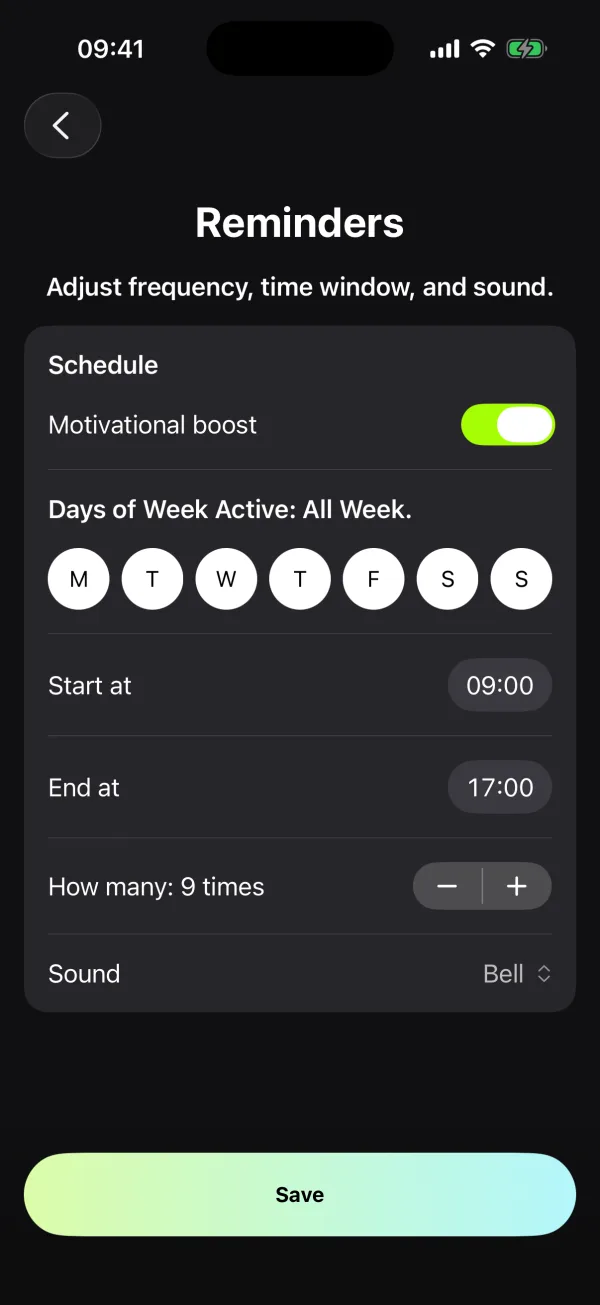
- In Moneyfesting, open Profile, then Reminders.
- Turn on Motivational boost. If iOS asks, allow notifications.
- Tap the days you want, then set Start at and End at.
- Set How many a day, from 1 to 16, and pick a Sound.
- Tap Save.
The quotes come from the categories under Profile, then Quote Categories. Each notification shows the quote, with its author as the title.
If no quotes arrive
Moneyfesting says "Notifications are off"
iOS is not letting Moneyfesting send notifications. Open the Settings app, tap Notifications, tap Moneyfesting and turn on Allow Notifications.
A Focus is on
A Focus such as Sleep or Work can hold notifications back. Allow Moneyfesting in that Focus, or check the quotes when it ends. Apple explains how in Allow or silence notifications for a Focus.
They arrive in a summary
If Moneyfesting is part of your Scheduled Summary, the quotes wait for the next summary. Open Settings, then Notifications, then Moneyfesting, and choose Immediate Delivery.
Questions
Can I choose which quotes I get?
Yes. Pick your categories in Profile, then Quote Categories. The same choice feeds the app and the Motivational Quote widget.
How do I stop them?
Turn off Motivational boost in Profile, then Reminders.