When blocked apps still open
Moneyfesting blocks apps through Apple's Screen Time. When a blocked app opens anyway, one of the checks below is almost always the reason. They are in order, most common first.
Updated 10 November 2026. Steps checked on iOS 26.1.
Quick checks
- Something is blocking right now. Apps stay blocked during a focus session, or during a Plan task that has a time and blocked apps. Tasks set to Anytime never block.
- You are not on a break. A break opens your apps until it ends. Tap Resume on the session screen to end it sooner.
- The app is on the list. Open the session's or the task's Blocked Apps and check that the app, or its category, is picked.
- Screen Time access is on. See the next section.
- Moneyfesting Pro is active. Blocking stops when the plan ends. Check in Profile, under Subscription.
Turn Screen Time access back on
If Screen Time access was turned off, Moneyfesting says "Screen Time access is off, so apps can't be blocked." on its task screens, and a running session shows a warning.
- Tap Turn On, then Continue.
- Allow access when iOS asks.
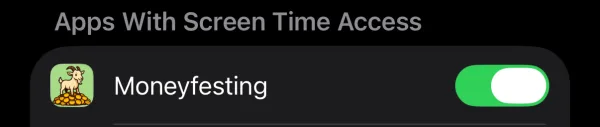
If iOS does not ask again, open Settings and tap Screen Time. Scroll to Apps With Screen Time Access and turn on Moneyfesting.
A session keeps running while access is off, without blocking. Blocking comes back as soon as access does.
Make blocking harder to switch off
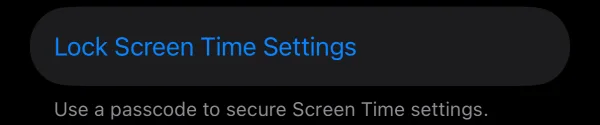
In a weak moment it is easy to turn Screen Time access off again. To make that harder, open Settings, tap Screen Time, then Lock Screen Time Settings, and set a Screen Time passcode. Ask someone you trust to type it, so only they know it. Changing Screen Time settings, including Moneyfesting's access, then needs that passcode.
Moneyfesting itself always leaves you a way out: a break or the end of the session.
What Moneyfesting blocks
- Apps and whole app categories. Pick at least one.
- Not websites. Safari and other browsers stay open, even though the iOS picker lists websites. Website blocking is not available yet.
The block screen
A blocked app shows Moneyfesting's block screen with a short message and a Close app button. Closing it does not unlock the app. To use the app during a session, take a break or end the session.
Still not working
- Restart your iPhone, open Moneyfesting, and start a new short session to test.
- Make sure iOS is up to date, under Settings, General, Software Update.
- Write to us from the Support page with your iPhone model, iOS version and what you tried.
Questions
Does Moneyfesting work on iPad or Mac?
Not yet. Moneyfesting is for iPhone, with iOS 26 or later.
Can I block a website?
Not yet. Moneyfesting blocks apps and app categories.
Why does iOS ask for Face ID or my passcode?
Apple protects Screen Time access, so only you can give or remove it.